

Need help choosing the right Adobe Creative Cloud courses? Call us:
Boston: 781-376-6044
Philadelphia: 610-228-0951
Toll Free: 800-851-9237

Hands-on Adobe Creative Cloud classes and Adobe Creative Cloud training using Mac or Windows computers with a live instructor in the same classroom.
Reviews of our Adobe Creative Cloud classes

Adobe Creative Cloud classes rating:
5 stars from 27 reviewers
"Overall the Creative Cloud class was fantastic. Michael was great as an instructor. He was fun and pleasantly interactive. He kept things moving along at a reasonable pace, and made sure that all participants could follow along. It was enjoyable and easy to follow. There were a few glitches but over all not enough to impact the ability to easily follow the course." - Kelly R
See all reviews for Adobe Creative Cloud coursesAll Adobe Creative Cloud classes include
 Free retake
 Detailed curriculum
 Live instructor
 Flexible rescheduling
 Certificate of Completion
 Small class sizes
 Course recording
Adobe Creative Cloud courses from the
authors of the best-selling training book
Adobe Creative Cloud for Dummies.
Creative Cloud training courses GSA
American Graphics Institute offers Creative Cloud Training Courses under GSA contract 47QTCA19D003Y. As a GSA contract holder, Creative Cloud training classes GSA pricing for federal agencies is available for both private and public Creative Cloud workshops. Contact an American Graphics Institute representative for additional information or to register.
Night and weekend Adobe Creative Cloud courses
In addition to our many weekday classes, American Graphics Institute also offers weekend and night Adobe Creative Cloud courses. These options are listed within the course schedules listed above, or contact AGI for upcoming night and weekend dates.
Keep updated with Creative Cloud news and information.
Recent Adobe Creative Cloud courses Training News

As the author of the Adobe Creative Cloud for Dummies, and a 20 year user of Adobe’s digital design tools, I’m often asked the question: what’s the best computer for Adobe Creative Cloud? Sometimes the question is phrased slightly differently: Is a Mac or Windows PC better for Adobe…

Adobe Creative Cloud, sometimes called Adobe CC, is a set of software application for Mac OS and Windows computers which are used by creative, design, and marketing professionals to create content for print, video, and online distribution. A small number of Creative Cloud applications are…

Learning Creative Cloud is a good choice for those interested in any career involving the creation of marketing materials, online content, videos, or digital images. Creative Cloud training helps to open doors to new job opportunities, or enables taking on new projects, and entrepreneurs gain…

The Adobe Creative Cloud is a robust suite of applications that can be used for a variety of purposes, from creating brochures or marketing materials to designing websites, retouching images, and editing video projects. Just as this suite of apps is quite broad, there are a number of options…
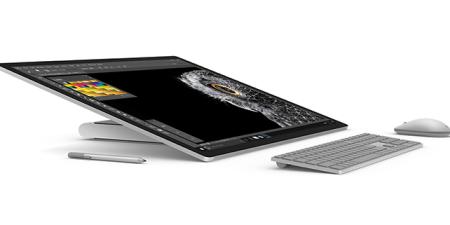
The updated Microsoft Surface Studio 2 for Creative Cloud applications is a good choice for those looking for a fast desktop computer for graphic design, video editing, or illustration. Microsoft moved into the computer hardware business several years ago with the Surface products which provided…

Adobe Bridge is a software application for managing files on Mac OS and Windows computers. It is part of the Creative Cloud. To fully understand what Adobe Bridge is, consider some frequently asked questions.
What is Adobe Bridge CC?
Adobe Bridge CC is software that you can use…
AGI's team of experienced instructors are also the best-selling authors of more than 20 books including Creative Cloud for Dummies, Creative Suite for Dummies, and many books published by Adobe Press, Microsoft Press, and other major publishers. Learn from experienced professionals with extensive professional and training experience, who are also practicing professionals. For Federal agencies, American Graphics Institute classes are offered under GSA contract 47QTCA19D003Y.