

3DS Max Course
Live, 3DS Max class online or in-person
3DS Max training class - Course length: 2 days
This Autodesk 3DS Max course provides a comprehensive training program to equip you with the skills needed for 3D modeling, animation, and rendering. Whether you are a beginner to 3D design or have been self-taught, this course provides comprehensive training on how to effectively use 3DS Max.
What you learn in this 3DS Max course
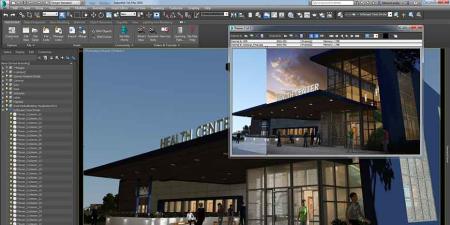
- Effectively navigate the Autodesk 3DS Max interface
- Project Configuration, Files and Objects
- Transforms and modifiers
- Creating 3D from 2D
- Shapes and compound objects
- Materials
- Introduction to animation
- Cameras
- Introduction to Autodesk 3ds Max Design lighting
- Standard and photometric lighting with Autodesk 3ds Max
- Applying three-point lighting for key, fill, and back lighting
- Rendering
Ways to attend this 3DS Max Course
- Live Online classes from your office or home as a regularly scheduled small group class.
- Live, in-person regularly scheduled 3DS Max classes in Boston or Philadelphia with a live instructor in the same classroom.
- Private training customized to your specific needs delivered in-person or online. Call 781-376-6044 or complete the Private 3DS Max Training form for more information.
- Corporate 3DS Max Training for your group or team.
Why 3DS Max classes at AGI are the best option for you
- Hands-on learning: Learn 3DS Max quickly with our proven teaching methods.
- Exceptional curriculum: AGI has delivered 3DS Max training to thousands over 25 years.
- Expert instructors: Our instructors are 3DS Max experts and skilled educators.
- Small class sizes: Receive personalized attention with 10 or fewer participants per class.
- Repeat for Free: If you need a refresher or miss a class day, retake the 3DS Max class at no cost.
All 3DS Max classes include
 Free retake
 Detailed curriculum
 Live instructor
 Flexible rescheduling
 Certificate of Completion
 Small class sizes
 Course recording
Reviews of our 3DS Max Course

3DS Max Course - Introduction rating: 5 stars from 1 reviewers
"Had the instructor all to myself and he was a 3D king. Loved it." - Matthew N
See all reviews for 3DS Max coursesThe class starts by teaching how to navigate the 3DS Max interface effectively, understanding the tools and layout for efficient workflow. You will learn the essentials of project configuration, file management, and object manipulation, providing you with the foundational skills for creating and managing 3D models. You'll also learn key concepts such as transforms and modifiers, which allow for advanced editing and refinement of models.
You will also learn to create 3D from 2D shapes, where you will learn how to convert basic 2D sketches into intricate 3D models using splines and compound objects. You will make these 3D objects more interesting and appealing as you add materials and textures, learning to apply realistic surface properties to your models. You will also learn to use lighting in 3DS Max Design.
The course also introduces the basics of animation, guiding you through the setup and manipulation of simple animations. You'll work with cameras to control scene perspectives and render stunning visual outputs. Rendering techniques are also covered to share optimized, high-quality output.
With real-world examples and hands-on projects, you will learn practical tips for workflow optimization, helping you become faster and more efficient in 3D production. By the end, you'll be confident in creating, animating, and rendering 3D models for use in architecture, product visualization, entertainment, video, and animation.
3DS Max Course - Course Dates
All classes are led by a live instructor. Class times listed are Eastern time.
3DS Max Training Class Topics
- Introduction to 3DS max
- 3D in production workflows
- 3D process overview: modeling/materials/animation/rendering
- 3DS max interface overview
- Creating objects: primitives such as boxes
- 3D objects from 2D shapes: 3D text, extrusions
- Transforms: position, rotation, and scale
- Managing objects: layers, hide, isolate
- Introduction to materials
- Adding lights and cameras
- Rendering
- More complex objects: modifiers
- Booleans and compound objects
- Introduction to polygon modeling: vertex, edge, poly sub-objects
- More complex materials: UVW coordinates
- Maps and Materials
- Texture unwrapping and painting with Photoshop
- Introduction to animation
- Keyframe animation
- Animating lights and cameras
- Rendering animation sequences
- Editing and compositing animation footage
3DS Max course instructors
AGI instructors are 3DS Max professionals and skilled teachers. You'll learn from a live 3DS Max professional that brings years of experience that will help you learn 3DS Max quickly and easily.

Sean
Art Institute of Philadelphia, Video Production
Author, Premiere Pro Digital Classroom
Author, After Effects Digital Classroom
Adobe Certified Instructor

Alex
BA, Film & Communications
Video producer
Animator

Drake
BFA
MFA
Professor, Keystone College

RJ
BA, Dual degrees
Certificate, Film making
Extensive professional experience
Custom and private 3DS Max classes
This 3DS Max course is available as a private class. Curriculum can be customized for your specific needs. 3DS Max classes can be delivered at your location, online, or in our classrooms. For more information, call 781-376-6044 to speak with a training consultant or contact us.
We recommend that you have installed the 3DS Max software before starting this class.
You will receive a comprehensive 3DS Max course manual for this class. For most Autodesk classes, AGI uses Autodesk approved curriculum.